A real-time volumetric cloud renderer written in C++ and OpenGL 4.6.
It started as an Eulerian fluid simulation, which is where the repository name and the FluidSim class come from, and turned into a cloud renderer somewhere along the way. Two compute shaders bake a noise field into a 3D texture, and a fullscreen raymarch lights that volume and draws it. Every number in the pipeline is wired to a Dear ImGui slider, so most of the time I spend in it goes to dragging values around and watching what the clouds do.
Building the density field
The cloud shape lives in a 128³ r32f 3D texture written by CloudBase.comp, dispatched in 8×8×8 workgroups. For every texel it does roughly this:
- FBM simplex noise, remapped to [0,1].
- A three octave FBM Worley field at the same position.
- The two combined with
remap(noise, 1 - worley, 1, 0, 1). That is the usual Perlin-Worley construction, and it carves billowy Worley structure out of the smoother Perlin base. - A vertical profile,
smoothstep(0, 0.55, h) * (1 - smoothstep(0.5, 0.9, h)), which fades the field in near the bottom of the cloud layer and back out at the top. - A
smoothstep(0.1, 0.18, ...)threshold to turn whatever survived into density.
A second shader, CloudDetail.comp, writes a quarter resolution (32³) Worley volume. It is created with GL_REPEAT on all three axes so it can be sampled at uvw * detailScale and tiled across the base volume without a seam. Its job is to erode cloud edges, which gets fine structure into the silhouettes without paying for a higher resolution base texture.
Both shaders can offset their sampling position along X by time * timeScale, which makes the whole field drift.
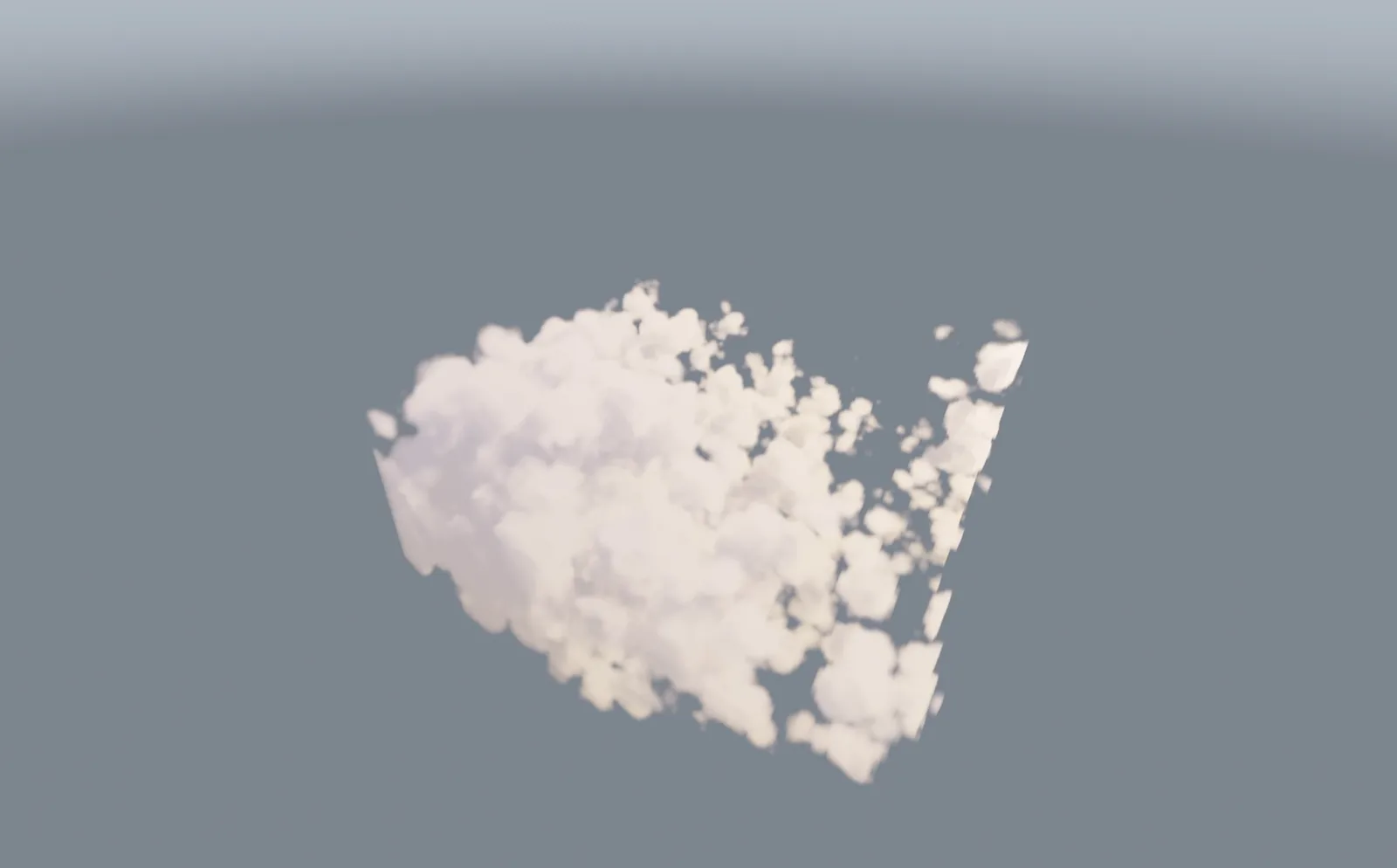
What the erosion volume does to a silhouette. The base field on its own is a smooth blob, and subtracting the tiled Worley from it is what produces the ragged edges and the loose fragments breaking off the side.
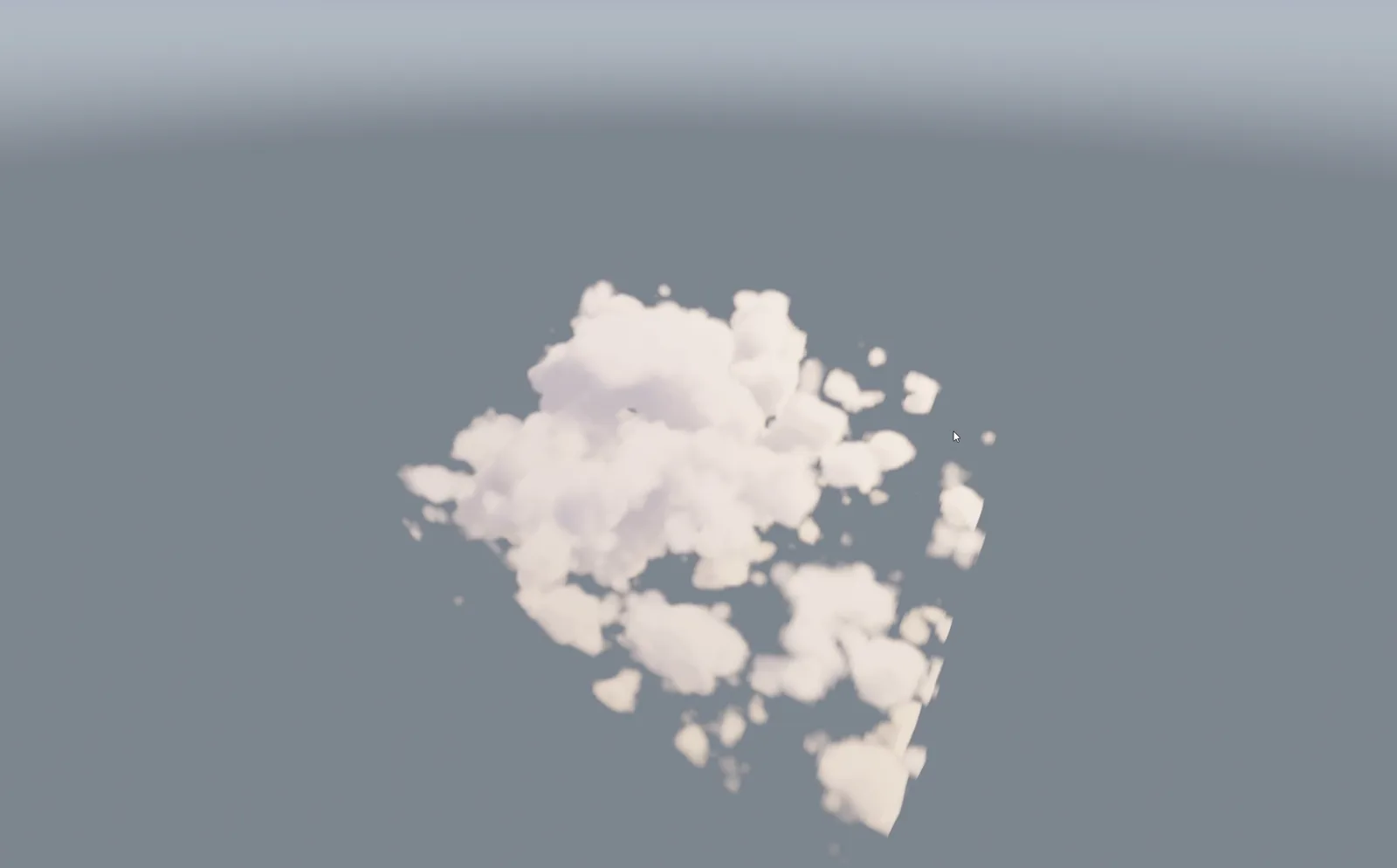
A different set of noise parameters on the same pipeline, pulling the field apart into separate puffs instead of one connected mass.
None of this touches the CPU. The compute shaders write into the textures with imageStore and the render pass reads them back as sampler3D, so there is no readback and no upload anywhere in the loop.
Only redoing work that changed
Both compute shaders are wrapped in a ComputePass, which holds the shader, a dispatch size, an iteration count, a memory barrier, a lambda that binds the uniforms, and three flags: enabled, continuous and dirty. Running the pipeline is then just:
for (auto& p : passes) {
    if (!p.enabled || (!p.continuous && !p.dirty)) continue;
    p.shader.use();
    for (int i = 0; i < p.iterations; i++) {
        if (p.bind) p.bind(p.shader, i);
        glDispatchCompute(p.groups.x, p.groups.y, p.groups.z);
        glMemoryBarrier(p.barrierAfter);
    }
    p.dirty = false;
}
Every ImGui slider ORs its return value into the dirty flag of the pass it belongs to, so moving a slider costs exactly one re-dispatch and then the pass goes quiet again. Ticking the animated noise checkbox sets continuous instead, which re-bakes every frame. A cloud that is sitting still costs nothing per frame while still being fully interactive, which is the difference between a usable tuning session and a slideshow.
Rendering
Everything after the compute stage is a fullscreen pass. There are no vertex buffers involved at all: Fullscreen.vert builds a covering triangle out of gl_VertexID, and each pass is one glDrawArrays(GL_TRIANGLES, 0, 3). The sky and cloud passes draw into an RGBA16F framebuffer and a composite pass brings that to the screen.
Sky.frag draws the backdrop: a zenith to horizon gradient, a pow(cos) glow around the sun, a smoothstep sun disk, and a fade to a ground tone below the horizon. The sun position comes from azimuth and elevation sliders that also drive the cloud lighting, so moving the sun moves both.
Cloud.frag is the interesting one. The view ray is rebuilt per pixel by pushing the NDC position through invViewProjMat from the camera UBO. A ray/AABB slab test against the volume bounds gives the entry and exit distances, and pixels that miss the box discard immediately. What is left marches through the volume at a fixed step size, capped by maxSteps, with the step stretched to fit if the slab is long. A per pixel hash jitters the starting offset, which trades banding for noise.
At each step the base volume is sampled trilinearly and then eroded by the tiled detail volume:
density = max(density - detail * detailStrength * (1.0 - density), 0.0);
The (1 - density) factor means erosion bites hardest at the wispy edges and leaves dense cores mostly intact.
Anywhere the density is worth shading, a second march runs toward the sun to work out how much light gets there. It takes three short steps for contact shadowing and four long ones for bulk occlusion, and bails out early once the accumulated optical depth makes the answer obvious. Scattering is approximated with three octaves of
sum += b * exp(-tau * a) * mix(hg(cosTheta, gForward * c), hg(cosTheta, gBack * c), gMix);
halving the eccentricity and scaling extinction and albedo on each octave, and mixing a forward and a backward Henyey-Greenstein lobe every time. That is what gives the silver lining on the sun side without flattening out the shadowed side. On top of that there is a Beer-Lambert powder term, 1 - exp(-2τ), weighted by how far the view direction points away from the sun so the darkening only appears where it physically should, plus an ambient gradient interpolated by height between two colours.
Samples are composited front to back with a per slab transmittance of exp(-density * step), and the loop breaks once transmittance drops below 0.01.

Looking up at the cloud with the sun behind it. The bright rim is the forward scattering lobe, and the light bleeding through the thinner blobs at the bottom is the powder term, which is why it only shows up on the side facing away from the camera.

The same scene from further out, which puts the sky pass on display. The sun disk, the glow falling off around it, and the fade to a ground tone below the horizon all come from Sky.frag.
Composite.frag then reads the HDR buffer, applies an exponential tonemap (1 - exp(-hdr * exposure)), gamma corrects, and adds a ±1/255 hash dither. The dither is there because smooth sky gradients band badly once they hit 8 bit output, and a pixel of noise is much less noticeable than a visible step.
Settings
The ImGui panel exposes essentially the whole pipeline, grouped roughly by which pass owns it:
- Density noise: amplitude, frequency, persistence, lacunarity, octaves, cell count, time scale
- Detail noise: the same set again for the erosion volume
- Sky: zenith, horizon and sun colour, sun intensity, sun size, glow strength and falloff
- Lighting: sun azimuth and elevation, light colour and strength, shadow density, near and far shadow reach
- Scattering: forward and backward
g, lobe mix, powder mix, ambient top and bottom colour - Quality: step size, max steps, jitter on/off, detail noise on/off
- Output: density scale, detail scale, detail strength, exposure
The application also hosts two other scenes, a cube scene used for instancing and picking and a heightmap terrain scene, behind a shared Scene interface. They can be swapped from a combo box without restarting, though the cloud scene is what it boots into.
Tech stack
| Component | Library / API |
|---|---|
| Language | C++17 |
| Graphics API | OpenGL 4.6 (compute shaders, DSA, 3D textures) |
| Shading | GLSL, #version 460 for fragment and 430 for compute |
| Window and input | GLFW |
| OpenGL loader | GLAD |
| Mathematics | GLM |
| UI | Dear ImGui |
| Build | CMake 3.16+ |
Project layout
FluidSim/
├── src/
│   ├── main.cpp / app.cpp       Entry point, main loop, scene switching
│   ├── Scene.h                  Scene interface
│   ├── FluidSim.h               The cloud scene: pipeline, uniforms, ImGui panel
│   ├── ComputePass.h            Compute pass struct and runPipeline()
│   ├── FluidCamera.h            Free-fly camera, uploads the camera UBO
│   ├── Shader.h                 Compilation, #include resolution, uniform setters
│   ├── CubeScene.h              Second scene: instancing and picking
│   └── TerrainScene.h           Third scene: heightmap terrain
├── shaders/
│   ├── CloudBase.comp           128³ Perlin-Worley density volume
│   ├── CloudDetail.comp         32³ tiling Worley erosion volume
│   ├── Fullscreen.vert          Fullscreen triangle, no vertex buffer
│   ├── Sky.frag                 Sky gradient and sun
│   ├── Cloud.frag               Raymarch, scattering, self-shadowing
│   ├── Composite.frag           Tonemap, gamma, dither
│   └── common.glsl              Shared simplex and Worley noise
├── vendor/                      GLFW, GLM, GLAD, Dear ImGui, all vendored
└── CMakeLists.txt
Controls
| Input | Action |
|---|---|
| W A S D | Move forward, left, back, right |
| Space | Ascend |
| Left Shift | Descend |
| Mouse | Look around |
| Tab | Toggle the cursor between the UI and free-fly |
| Escape | Close the window |
Building
You need a GPU and drivers with OpenGL 4.6, a compiler with C++17 support, and CMake 3.16 or newer. Everything else (GLFW, GLM, GLAD, Dear ImGui) is vendored under vendor/, so there is nothing to install first.
git clone https://github.com/Sahriz/FluidSim
cd FluidSim
mkdir build && cd build
cmake .. -G "Visual Studio 17 2022" -A x64
Then open the generated solution and build the FluidSim target. Shaders are handled two ways: a post-build step copies shaders/ next to the executable, and the source shader directory is also baked in as a SHADER_DIR compile definition, so it runs correctly from either the build output or from inside the IDE.
What's next
- Split the render settings panel. Sky, cloud lighting and composite controls currently share one ImGui section even though they belong to three different passes.
- Expose the height profile so cumulus, stratus and cirrus layers can be dialled in instead of being hard-coded.
- Temporal reprojection, so the previous frame's march can pay for more steps per pixel at the same cost.
- Skip the detail sample deep inside dense cores, where it barely changes the result but still costs a texture fetch every step.
- A 2D weather map driving coverage and cloud type across the volume, rather than one global height profile.